

Why dynamic tool discovery solves the context management problem

Lunar's Intent-Based Dynamic Tool Selection solves the agent context management problem by loading only the tools a task needs at runtime. This post explains how it works, why it matters for accuracy and security, and how to get started.

March 18, 2026
Why dynamic tool discovery solves the context management problem
TL;DR
- Static tool injection breaks at scale: 50+ tools consume 77K tokens before any task runs
- Dynamic selection drops that to ~8.7K by loading only what the agent needs
- Lunar MCPX delivers this as infrastructure: Tool Groups, policy gating, and auto-refresh
- The result is deterministic tool access, a smaller attack surface, and a full audit trail

Dynamic tool selection enables agents to work with massive tool libraries that would otherwise exceed context window limits. The assumption that agents could discover tools at runtime has existed from the start of MCP, but recent advancements in 'tool search' capabilities (following the Advanced Tool Use framework from Anthropic) make it practical for production use.
This evolution in how agents interact with the MCP protocol unlocks new capabilities without pushing context windows to extreme limits, making large-scale tool catalogs viable for the first time.
That shift sounds subtle. It is not. It impacts context efficiency, security posture, orchestration strategy, and ultimately, how scalable your agent architecture can become.
In this post, we unpack the concept, the problems it solves across context, security, and orchestration, and how Lunar.dev productizes the same principle as a governed runtime capability with Tool Groups, policy gating, and tool list auto refresh behavior via MCP list change notifications, where supported.
What Dynamic Tool Selection Actually Is
As tool ecosystems grow, the traditional approach of sending the entire tool catalog in every request quickly breaks down. Large schemas increase token usage, slow down responses, and push the model's context window to its limits. To solve this, Anthropic introduced the Tool Search Tool as part of the Advanced Tool Use framework: a mechanism designed to make large-scale tool libraries practical in production environments.
The idea behind Dynamic Tool Selection is simple but powerful: register the full tool catalog with the API, but avoid loading everything into the model's context up front.
Instead, tools can be marked as deferred:
defer_loading: true
You register the full tool catalog with the API, but mark most tools as deferred, so they are discoverable but not injected into the model's context up front. The model initially sees only a search primitive and any explicitly non-deferred core tools. When the model needs additional capabilities, it calls the search primitive. The API returns a small number of tool_reference objects, typically three to five. Only those references are expanded into full schemas inside the active context.
The core principle is: Discovery first. Injection second.
This pattern allows agent systems, MCP servers, and gateway-based architectures to scale to hundreds or thousands of tools without exploding context size, making Dynamic Tool Selection a key building block for real-world, production-grade agent infrastructure.
Why Static Full Catalog Injection Breaks at Scale
Static tool injection assumes that showing the model everything improves decision-making. That works at a small scale. It degrades rapidly as catalogs grow.
1. Context and Token Overhead
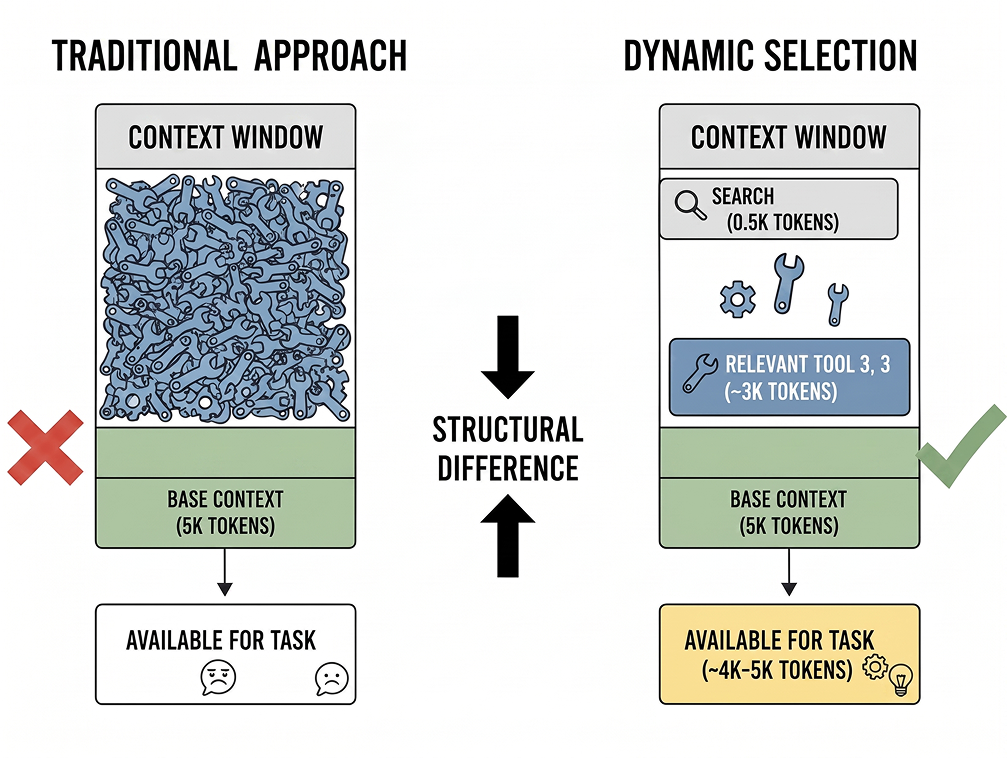
Tool schemas consume significant context. Anthropic's data shows 50 MCP tools requiring roughly 72K tokens just for definitions, 77K total before any task execution begins. In typical production setups, 50 tools cost 10K–20K tokens of context that cannot be used for reasoning, memory, or output.
MCPX's dynamic tool selection changes the cost structure. The upfront search primitive costs approximately 500 tokens. A typical search returns 3–5 relevant tools at roughly 3K tokens total. In Anthropic's framing, this results in 8.7K tokens of total context consumption, compared with 77K in the static approach. The difference is structural, not incremental.
2. Accuracy Degradation
Tool selection accuracy degrades when too many tools are visible simultaneously. Anthropic's evaluation data shows that selection quality drops significantly once models see more than 30–50 tools in conventional setups. Enabling Tool Search improves MCP evaluation accuracy by reducing the visible tool space.
Fewer visible tools reduce interference and ambiguity. In production, we've seen this translate directly to fewer incorrect tool calls and fewer retry loops.
3. Observability and Governance Blind Spots
When every tool is always in scope, it becomes harder to answer a basic question: what was the model actually allowed to use at decision time?
Static injection makes the eligibility boundary implicit. Dynamic selection makes it explicit. The discovery step produces a shortlist that can be logged, audited, and analyzed.
Context and Token Management Value
The headline benefit is simple: restore the context window to doing work rather than describing capabilities.
Tool definitions consume significant portions of context. Tool search exists specifically to address both context efficiency and the selection accuracy cliff. By paying for only the tools actually needed for a given task, you preserve the majority of your window for reasoning, chaining, and execution.
For teams running multi-step agents, retrieval-augmented workflows, or long-lived sessions, this is not optimization theater. It is architectural hygiene
Security, Governance, and Observability
Dynamic selection is not a silver bullet for LLM security. It is, however, a structural control.
Threat models increasingly include tool poisoning and prompt injection embedded in tool metadata. If malicious or compromised tool descriptions are injected into the model’s decision boundary, they can manipulate tool calls or bypass guardrails.
We covered the full MCP attack surface in MCP Risk Analysis: Attack Vectors and Lunar's AI-Driven Risk Assessment.
Dynamic selection contributes to several governance outcomes:
- Reduced attack surface in context: fewer tool schemas are present at any moment.
- Contextual least privilege: only tools discovered for the current task are eligible for use.
- Observability: discovery produces an explicit shortlist that can be logged and audited.
In other words, dynamic selection narrows exposure windows and clarifies accountability.
Agent Efficiency and Orchestration
Dynamic tool selection improves efficiency in two complementary ways.
First, it improves tool choice. Research reports significant accuracy gains in MCP evaluations when dynamic selection mechanisms are enabled.
Reducing tool space interference aligns with what we observe in production systems: narrower scope improves decision clarity. However, this assumes the model selects the right tools, which is not always guaranteed in practice. Some models perform significantly better at tool selection than others, and results vary depending on the underlying architecture and tuning.
Tool selection quality is also heavily influenced by prompt design. A well-structured prompt guides the model toward the correct tools, while a vague or overloaded prompt can make selection less reliable, leading to unnecessary searches or incorrect tool usage. For a deeper look at how prompts shape tool selection and agent reasoning at runtime.
Second, it improves orchestration discipline. Once you can reliably discover relevant tools, you can begin to externalize repeated multi-step sequences from the model and into deterministic workflows. Instead of relying on probabilistic chaining inside the LLM for strict multi-step processes, you can combine discovery with programmatic tool calling, reducing context pollution from intermediate reasoning and making flows more predictable.
Dynamic tool selection often becomes the first step toward a more governed, hybrid orchestration model. Rather than loading every available tool into context up front, the agent discovers what it needs when it needs it.
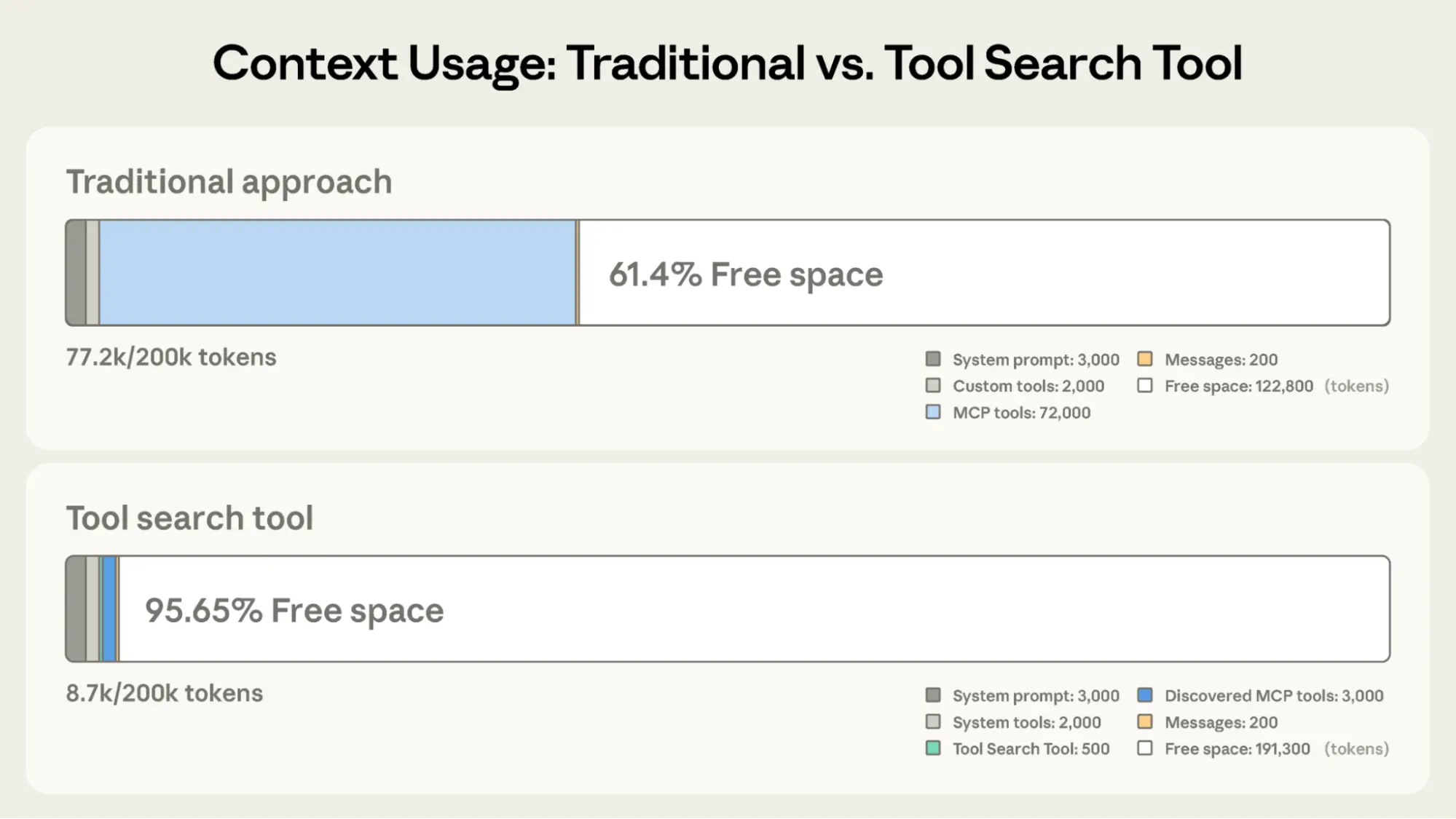
[Context Usage Comparison: Traditional vs Tool Search Too by Anthropic]
How Lunar Productizes Dynamic Tool Selection
At Lunar.dev, we have released Dynamic Tool Group Selection as a governed, runtime implementation of the same principle: agents should see only the tools they need, when they need them, and tool exposure should be centrally controlled.
Within MCPX:
- Tool Groups allow teams to organize tools across multiple servers into reusable collections aligned to workflows.
- These groups can be applied across multiple agents, keeping access consistent across environments.
- Policy gating enables runtime control based on identity, environment, or workload.
- Tool exposure becomes a dynamic control surface rather than a static registry decision.
We also address the stale-tool-view problem. By aligning with MCP list changed notifications, MCPX can signal clients when tool access changes. In clients and IDEs that support this behavior, the tool list can auto-refresh. Where client support is incomplete, fallback behavior may require a restart or periodic resync, depending on the client.
The result is a cross-client, runtime-governed implementation of dynamic tool selection, not just a prompt engineering pattern.
We believe this pattern is foundational for the next generation of governed, production-grade agent systems. We would genuinely value your thoughts and feedback on the feature, how you are approaching tool scaling in your own systems, and where you see the biggest gaps or opportunities in dynamic selection and governance.
Dynamic Tool Group Selection is available now in MCPX. To get started, see the documentation or book a demo.
Ready to Start your journey?
Govern all agentic traffic in real time with enterprise-grade security and control. Deploy safely on-prem, in your VPC, or hybrid cloud.
.png)

.png)
.png)

